A song library grows a little at every gig. Eventually, the filenames and duplicate versions need some attention.
You know the one. Twenty thousand files. Frank Sinatra - My Way.mp3 next to frank_sinatra_my_way_(1).zip next to SINATRA, FRANK - MYWAY.MP3 next to a file literally named Track01. Six different brands pressing the same song. And sometimes a damaged ZIP only turns up when someone requests it.
It is understandable to put off cleanup when the library already gets you through a show. You want to know what will change before touching the files.
I built the Library Management tools because I needed them for my own shows. You review the choices, then let the app apply them across the library.
Start with a library overview
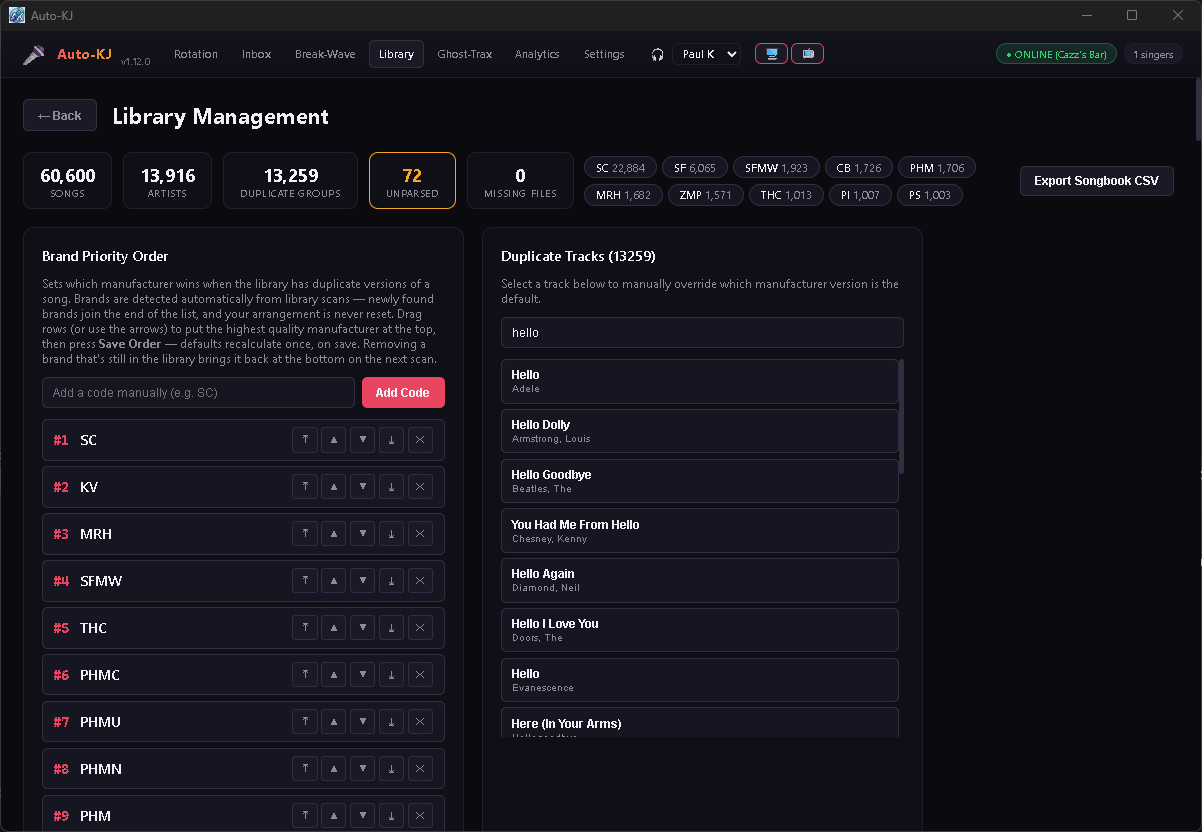
Open the tab and the first thing you see is a row of numbers: how many songs, how many artists, how many duplicate groups, how many unparsed, and how many missing files you're carrying. Then a row of brand chips — SC, DK, SF, PHM — showing exactly how your library breaks down by manufacturer.
Use those counts to decide what needs attention first. You can also export a printable songbook as a CSV.
Brand Priority: choose the versions you prefer
When you have several versions of a song, you can tell Auto-KJ which manufacturers you prefer.
The Brand Priority Order card lists every manufacturer detected in your library. Drag Sound Choice above Sunfly, put Pocket Songs under DK, drop the bootleg-looking code to the bottom — then hit Save Order.
The moment you save, Auto-KJ walks your entire library and re-sets the default version of every duplicate according to your ranking. Every "My Way" now points at the pressing you actually want. It's not a one-at-a-time chore; it's a library-wide policy.
Drag manufacturers into the order you want, then save. Auto-KJ recalculates the preferred versions once when you save. Newly detected brands go at the bottom, keeping your existing order.
The duplicate resolver: pick your pressing per song
When Auto-KJ finds the same song across multiple manufacturers, it groups them. Click any group and you get a clean Version Options table: which pressing is the default, the brand, the disc/track number, and the actual filename.
One click on Make Default and that's the version every singer gets when they request the song. The old default doesn't disappear — it stays in the group, ready to swap back any time. You're not deleting music. You're just choosing which record the needle drops on.
Fix Unparsed Songs: repair, don't delete
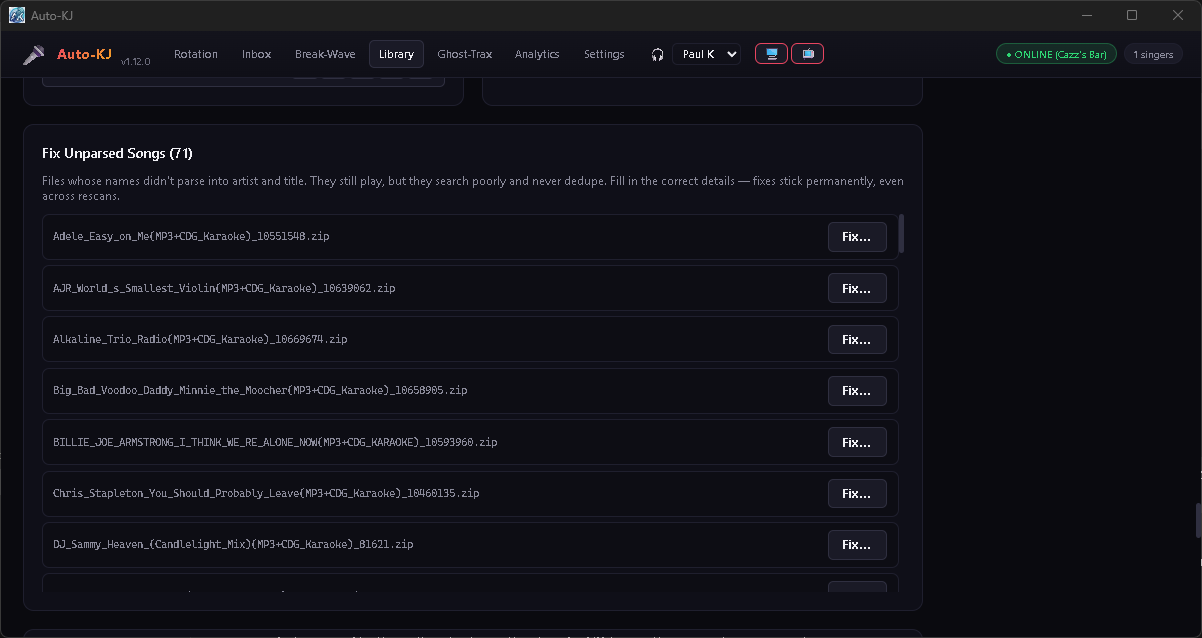
Every library has a handful of files that just refuse to parse — weird names that don't split into artist and title. They still play, but they are harder to find and may not group with matching songs.
The Fix Unparsed Songs card lists them all. Click Fix…, type the right artist, title, and brand, check Rename file to match if you want the file itself cleaned up on disk, and save. Here's the part that matters: the fix is sticky. It survives every future rescan, because Auto-KJ flags your corrections as manual metadata and never lets a directory scan overwrite them.
The same engine powers Edit Song Details, where you can search the entire catalog, find a song that parsed wrong (swapped artist and title, wrong brand), and correct it — permanently, and optionally renaming the file so even a from-scratch scan gets it right.
The cleanup crew (that never deletes anything)
Cleanup moves unwanted files to a Quarantine folder next to your library, grouped by reason. Review them there before deciding what to delete yourself.
What does the cleanup crew do?
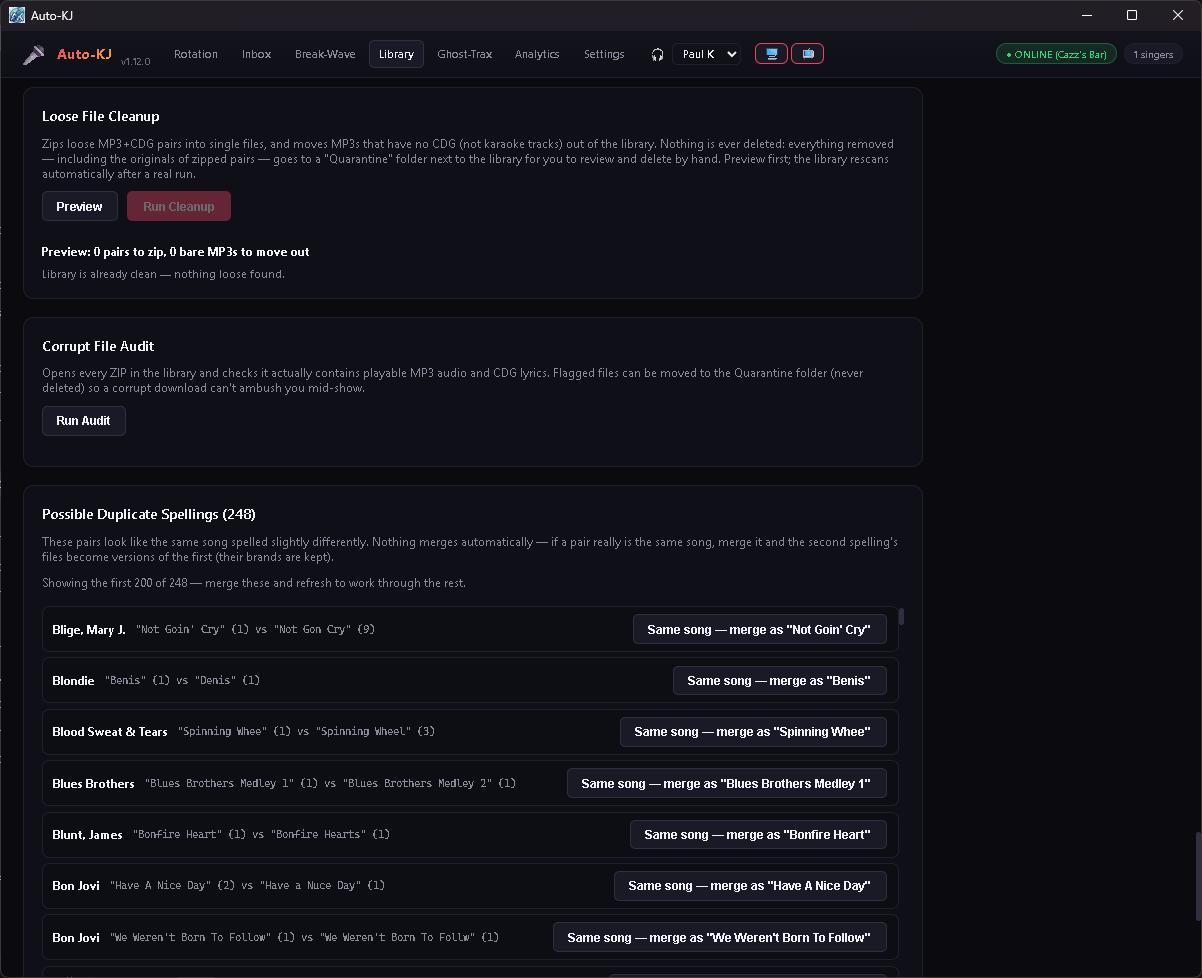
Loose File Cleanup — finds stray MP3+CDG pairs sitting as two files and zips them into one; finds bare MP3s with no CDG (not karaoke tracks) and moves them out. Preview first, then run. The library rescans itself afterward.
Missing Files — catalog entries pointing at files that are gone (moved, renamed elsewhere, disconnected drive). These are the songs that'd fail the second a singer requests them. Remove the entries, never the files.
Corrupt File Audit — opens every ZIP in your library and verifies it actually contains a playable MP3 audio stream and a CDG lyrics stream. A corrupt download gets flagged before it can ambush you mid-show.
Redundant Copies — the exact same pressing sitting in three different folders. One copy is kept; the extras go to Quarantine.
Every one of these is a "review it yourself" operation, not a "trust the computer" operation. The computer does the heavy lifting; you keep final say. That's the deal.
The detective work: duplicate spellings & artist variants
Two songs that are secretly the same song but spelled differently — Love Shack and Love Shack (Radio Edit) — show up in Possible Duplicate Spellings. One click merges the second spelling into the first, keeping both files' brands, so nothing is lost and nothing double-lists.
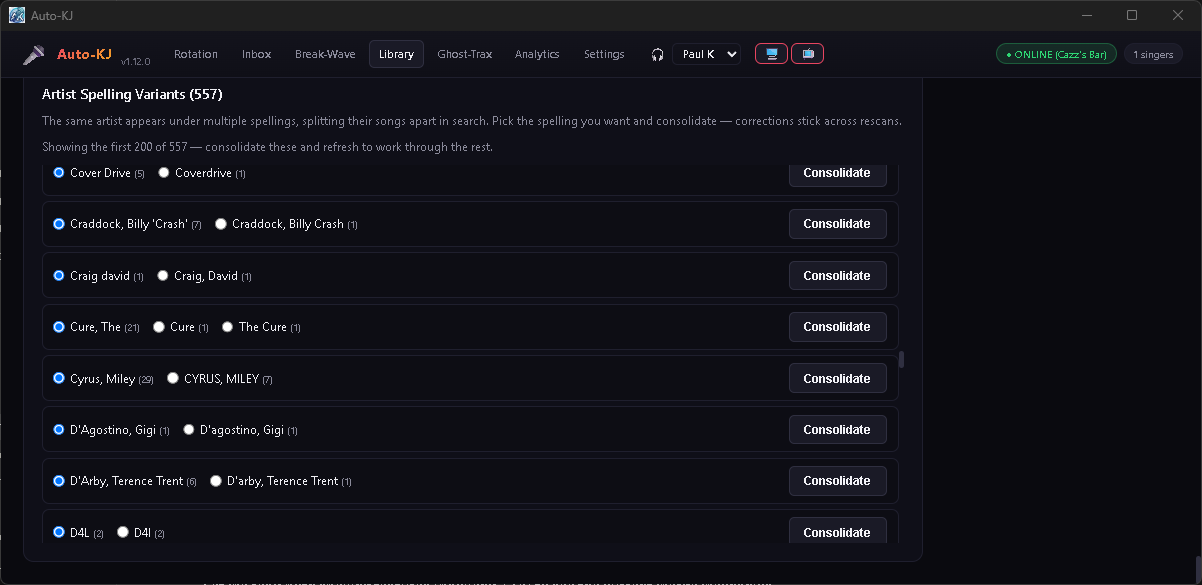
Same idea for Artist Spelling Variants: Prince vs Prince & The Revolution vs The Artist Formerly Known As Prince. Auto-KJ spots when one artist's catalog is split across spellings, you pick the spelling you want, and one Consolidate button reunites the catalog. Your choices are preserved across rescans.
Working with a large library
This is the unglamorous part that matters when you've got 60,000 songs: every health check — stats, missing files, redundant copies, duplicate spellings, artist variants — loads in parallel, so one slow report can't blank the whole screen. Long lists render in capped pages with the totals still shown up top. And the brand recalc runs once on save, not on every drag.
These choices help keep the tools usable while larger reports load.
Keep your library working the way you want
Auto-KJ remembers your preferred manufacturers, corrected song details, and duplicate choices. That means less searching for the right version when a singer asks for a song.
GET THE FREE VERSIONMore guides: rotation rules · Fairness Engine · all guides